
If you’re skeptical about AI in software development, you’re not alone. Maybe you’ve heard buzzwords like “AI-powered” and wondered: Is this just marketing hype? Does it really understand my requirements? Will it replace my expertise?
Let’s cut through the noise. This guide walks you through exactly how an AI textual analysis tool transforms your raw notes into structured software models—step by transparent step. No black boxes. No magic. Just a practical online AI diagram generator that works with you, not against you.
Using the professional AI-powered textual analysis tool from Visual Paradigm as our example, we’ll demystify the process using a real-world scenario: building a Student Registration System. By the end, you’ll see how this AI requirements analysis tool becomes your most reliable teammate.
Why Skeptics Should Care: AI as a Transparent Assistant
Before we dive in, let’s address the elephant in the room: AI isn’t here to replace your judgment. Think of this online AI business analysis tool as a highly attentive intern—one that never gets tired, never misses a noun, and always asks for your approval before finalizing anything. Every suggestion it makes is visible, editable, and traceable back to your original text.
This transparency is what separates a useful AI software design tool from a mythical “auto-pilot.” You remain in control. The AI simply accelerates the tedious parts of requirements engineering so you can focus on strategy, stakeholder alignment, and creative problem-solving.
Step 1: Define Your Problem Domain (You Start Here)
The process begins with you. In the easy-to-use AI textual analysis workflow, you simply type your application name—like “Student Registration System.” That’s it. No complex configuration. No training data to upload.
This simple input gives the AI class diagram maker the context it needs. The interface lets you select your language and browse sample projects if you need inspiration. This isn’t AI guessing your needs; it’s AI waiting for your direction.
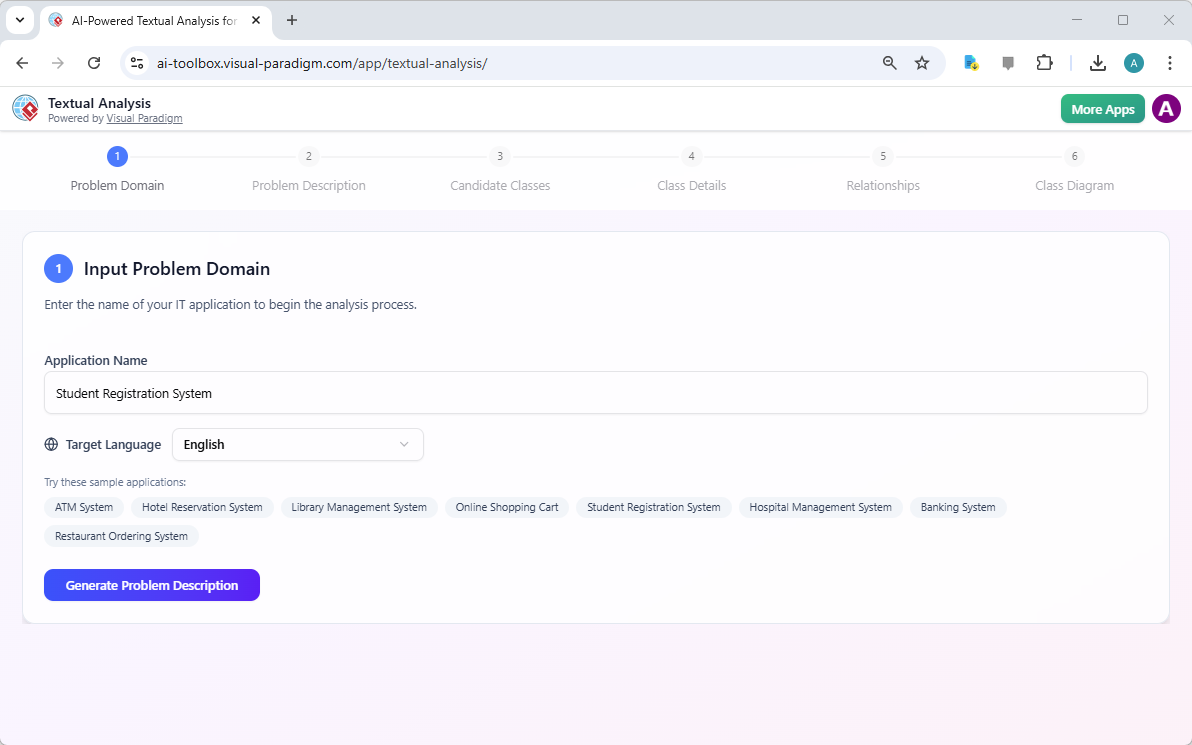
What’s happening behind the scenes? The tool is preparing its natural language processing engine to recognize domain-specific vocabulary (like “enrollment,” “prerequisite,” “faculty”) relevant to academic systems. It’s setting up a focused lens—not making assumptions.
Step 2: Watch AI Generate a Problem Description (And Edit Freely)
Based solely on your application name, the AI-driven requirement elicitation feature generates a structured problem description. For our Student Registration System, it might produce:
“A unified platform to streamline student enrollment, replacing inefficient paper-based workflows. Students can browse course offerings, check real-time availability, and submit enrollment requests. Faculty can review and approve requests while validating prerequisites.”
Notice what this isn’t: a final, unchangeable document. This is a professional textual analysis artifact that serves as a starting point. You can edit every sentence, add constraints, or rewrite sections entirely. The online AI UML generator is giving you a draft to refine—not a decree.
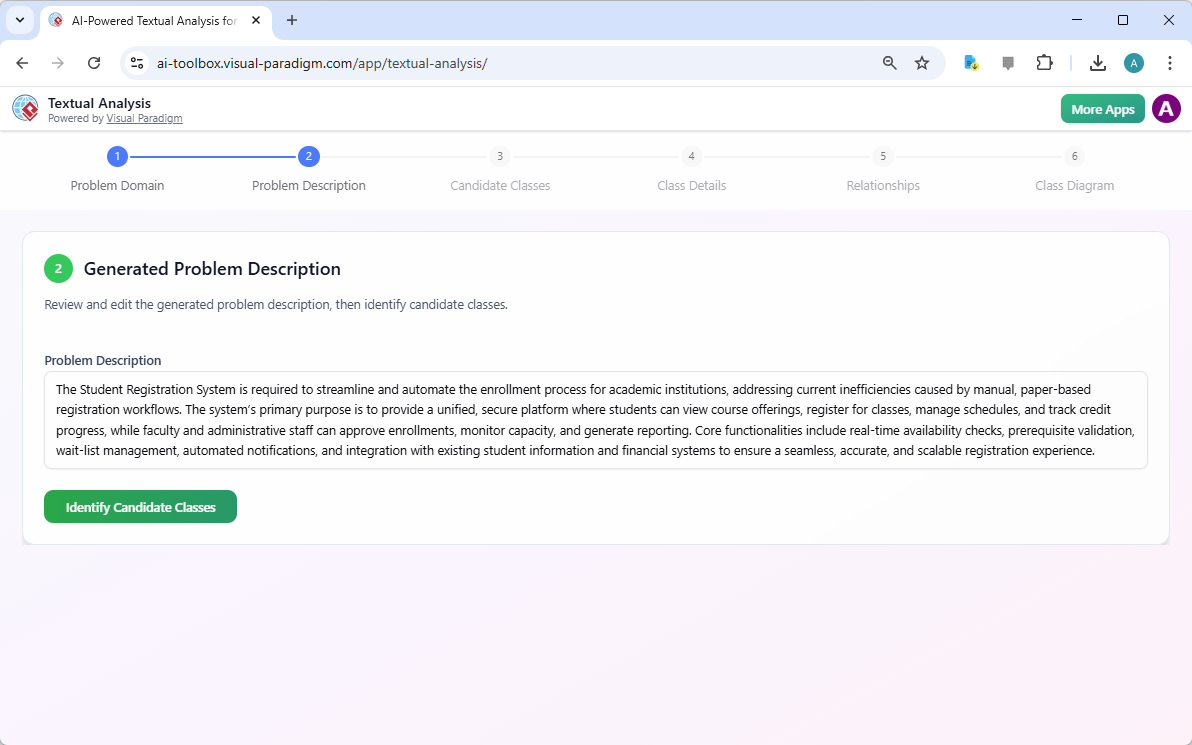
Why this matters for skeptics: You see exactly how the AI interprets your input. If it misses a nuance, you correct it immediately. This iterative collaboration builds trust—and better requirements.
Key Benefits You Can Verify Immediately
- Time Savings You Can Measure: What used to take hours of manual note synthesis now takes seconds. Track the difference yourself.
- Error Reduction You Can Audit: The AI consistently flags actors, constraints, and business rules. You review each suggestion—no blind acceptance.
- Traceability Built-In: Every generated element links back to your original text. No more lost requirements.
- Consistent Documentation: The AI textual analysis software applies uniform phrasing and classification standards, reducing team confusion.
- Instant Visualization: Raw text becomes candidate classes and relationships in real-time—no waiting for a specialist.
Step 3: See How AI Identifies Classes (And What It Excludes)
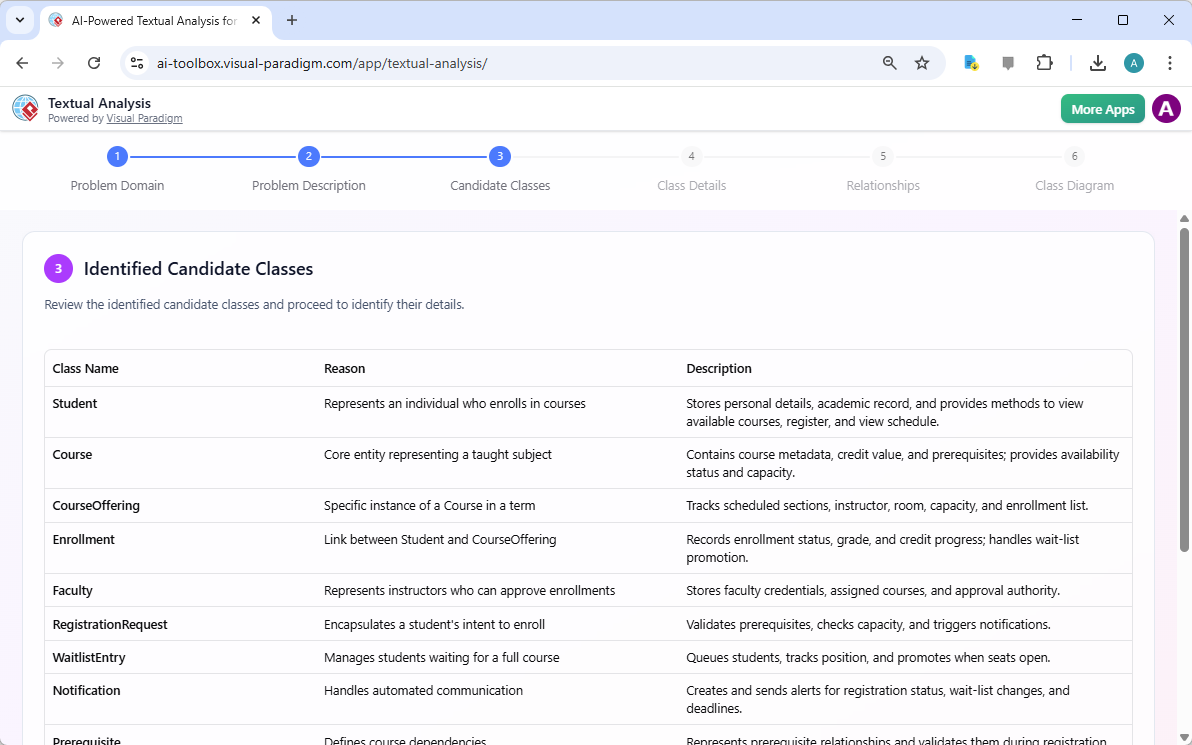
Now the professional AI-powered textual analysis tool performs a linguistic audit of your problem description. It extracts nouns that represent potential software entities—like Student, Course, Faculty, and Enrollment.
Each candidate class comes with:
- A logical reason for inclusion
- A description of its responsibilities
- Clear traceability to the source text
Crucially, the tool also shows what it excludes. In the “Nouns Not Qualified” section, you’ll see terms like “real-time,” “secure,” or “manual.” The AI explains why: these are qualitative attributes, not domain entities. This transparency teaches best practices in systems analysis while keeping your class diagram clean and focused.
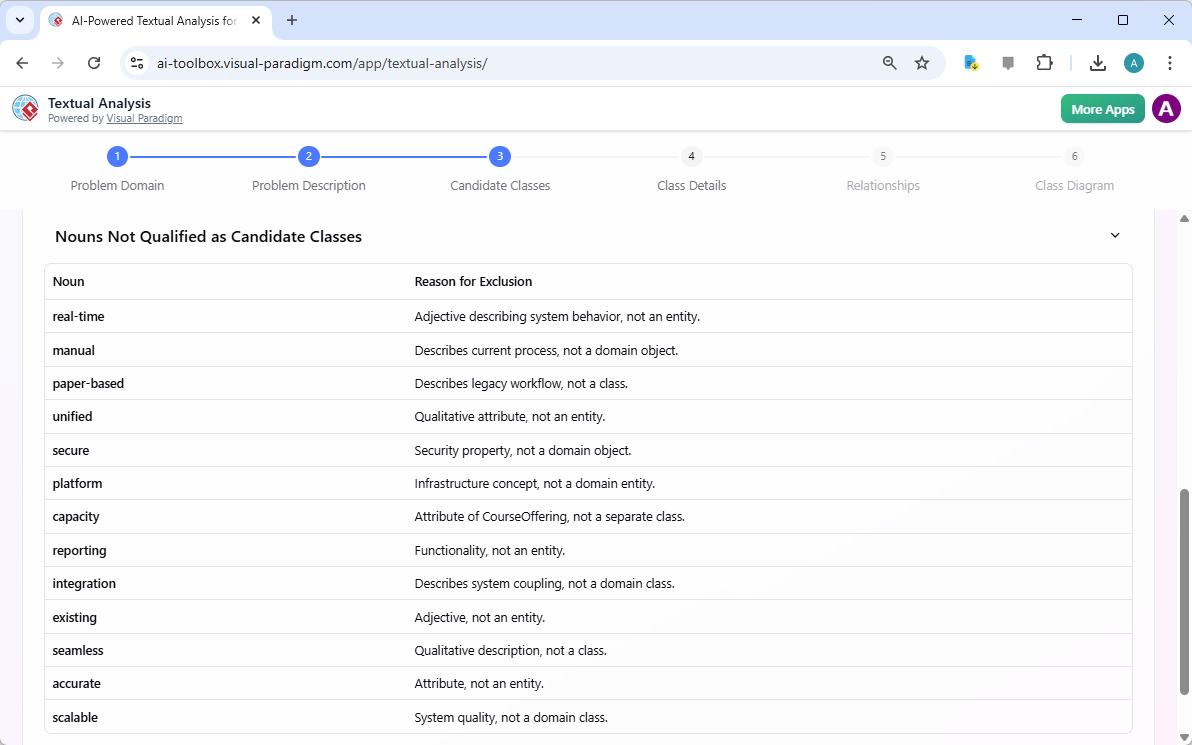
For the skeptical analyst: This isn’t AI making arbitrary decisions. It’s applying consistent, explainable rules that you can override. You’re not losing control—you’re gaining a second pair of eyes that never overlooks a detail.
Step 4: Review AI-Suggested Attributes and Operations
Once classes are identified, the best AI business analysis tool proposes their internal structure. For an “AcademicTerm” class, it might suggest:
- Attributes: termId (String), name (String), startDate (Date), endDate (Date)
- Operations: isActive(), getDuration()
For a “Course” class:
- Attributes: courseId (String), title (String), creditHours (Integer), description (Text)
- Operations: meetsPrerequisite(), isAvailable()
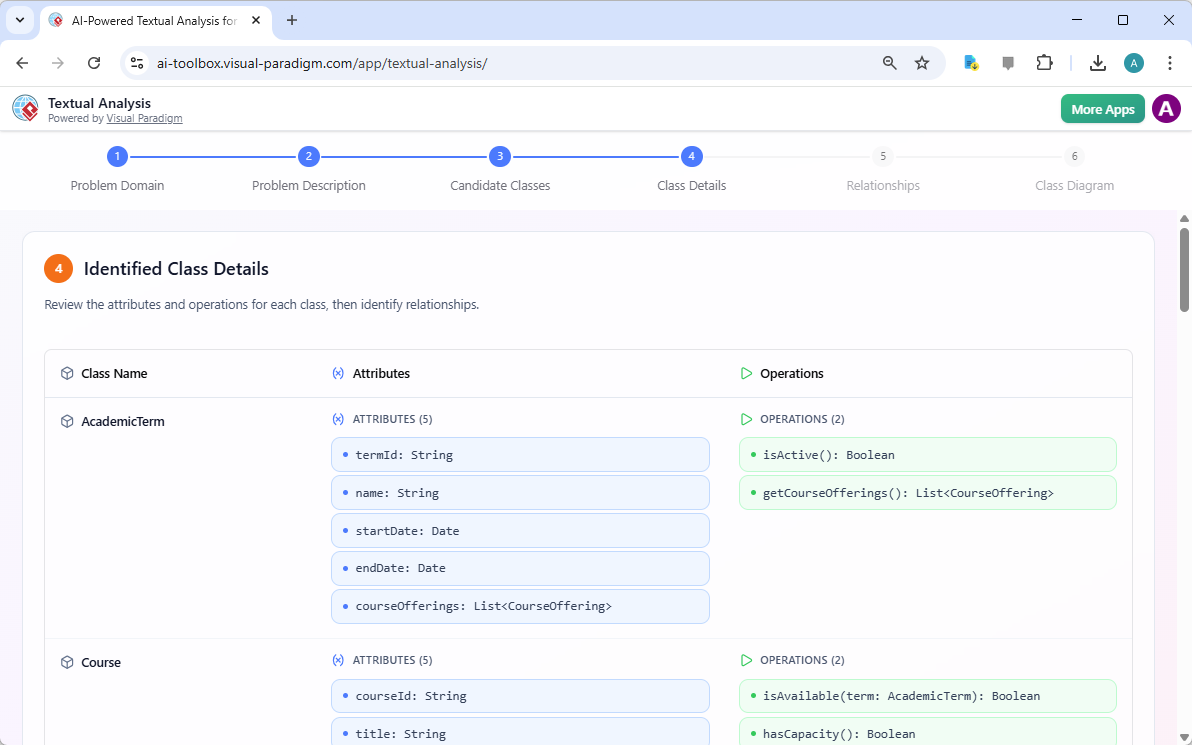
Everything is editable. Add custom parameters, adjust data types, or remove suggestions that don’t fit your context. This online software modeling tool handles the repetitive detailing work so you can focus on business logic and edge cases.
Step 5: Understand How AI Maps Relationships
The AI-powered diagramming tool now identifies how classes interact. It recognizes patterns like:
- “An AcademicTerm contains multiple CourseOfferings” → 1-to-many aggregation
- “A CourseOffering links to a specific Course” → association
- “A Student submits multiple Enrollment requests” → composition
Each relationship includes a natural language explanation, making it accessible to non-technical stakeholders. This clarity helps verify structural integrity before development begins.
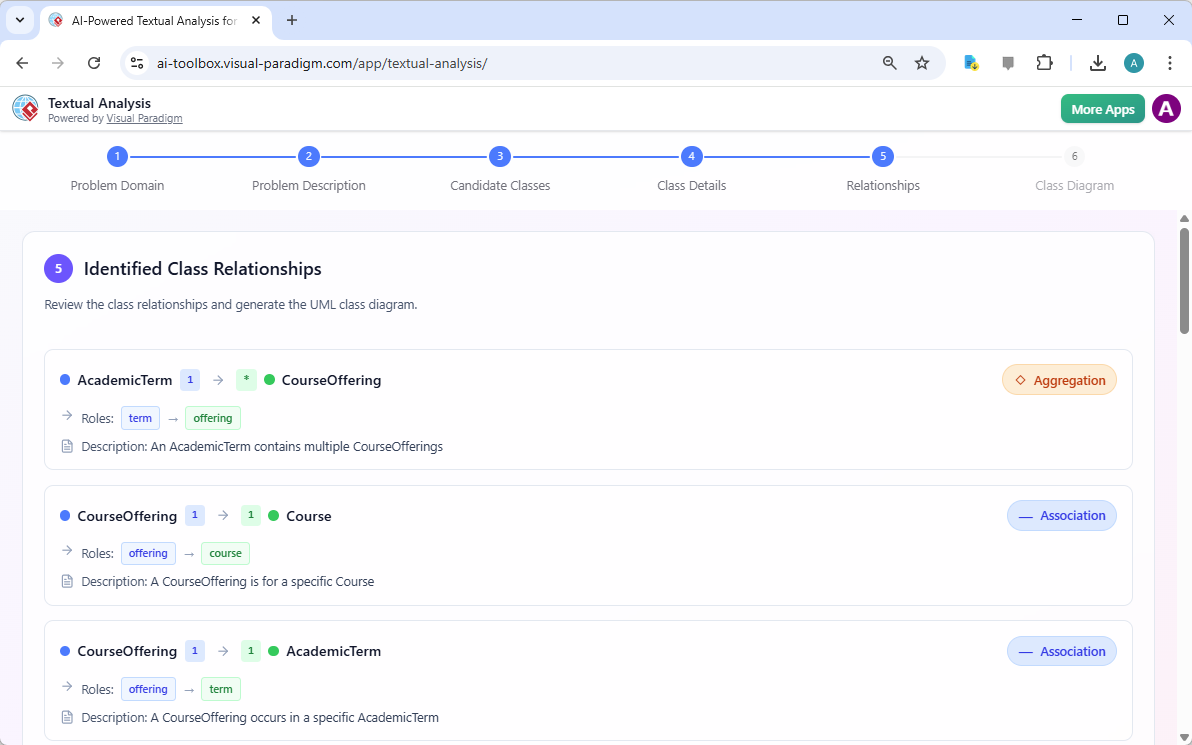
Why skeptics appreciate this: You see the logic behind each connection. If the AI misinterprets a relationship, you correct it with one click. The AI UML generator learns from your feedback, improving suggestions over time within your project.
Step 6: Generate Your Final UML Class Diagram
The culmination is a professional UML Class Diagram assembled from all previous steps. This isn’t just a static image—it’s a fully integrated, editable model within the Visual Paradigm environment.
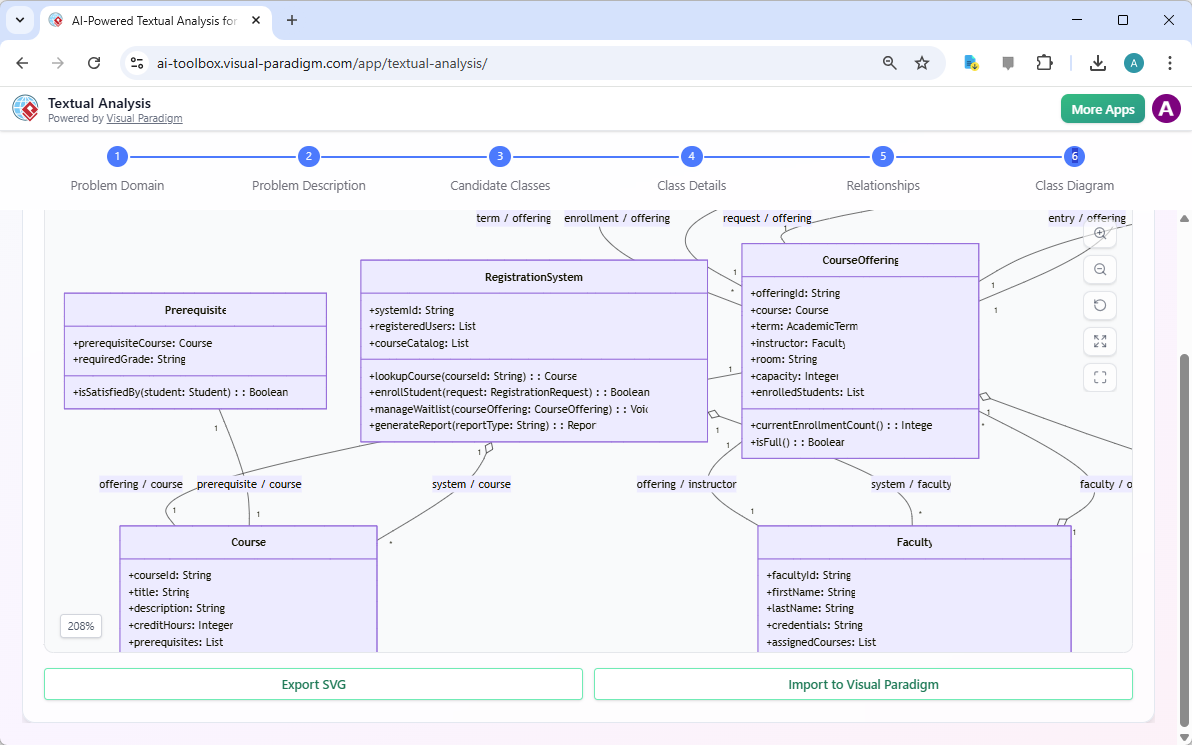
From here, you can:
- Export as SVG for reports or presentations
- Import directly into your main project for further development
- Generate code skeletons for multiple programming languages
- Collaborate with team members in real-time
This seamless transition—from “Student Registration System” text prompt to complete architectural blueprint—demonstrates the practical value of an AI-powered software design tool. It’s not about replacing human expertise; it’s about amplifying it.
Addressing Common Skeptic Concerns Directly
“Will this AI understand my unique domain?”
The tool starts with your input and your edits. It doesn’t assume—it suggests. You guide its understanding through iterative refinement.
“What if the AI makes a mistake?”
Every suggestion is visible and editable. You approve, modify, or reject each element. The audit trail ensures full traceability.
“Is my data secure?”
Visual Paradigm offers both cloud and on-premise deployment options. Your requirements stay under your control, with enterprise-grade security protocols.
“Does this work for agile teams?”
Absolutely. The online AI requirements extractor accelerates sprint planning by turning user stories into structured models in minutes, not hours.
Getting Started: Your First Project in 10 Minutes
Ready to see for yourself? Here’s how to begin:
- Download the latest version of Visual Paradigm from Visual Paradigm’s download page
- Open the AI Textual Analysis feature
- Type your application name or paste meeting notes
- Review, edit, and approve each AI suggestion
- Export your professional-grade model
No training required. No complex setup. Just a practical online AI diagram maker that respects your expertise while accelerating your workflow.
Continue Learning: Trusted Resources
Explore these resources to deepen your understanding of how textual analysis tools bridge unstructured information and formal design:
- AI Textual Analysis – Transform Text into Visual Models Automatically: Learn how this feature leverages AI to analyze text documents and automatically generate UML, BPMN, and ERD diagrams.
- AI-Powered Textual Analysis: From Problem Description to Class Diagram: A specialized guide focused on converting natural language problem descriptions into accurate, production-ready class diagrams.
- Textual Analysis in Visual Paradigm: From Text to Diagram: Official documentation detailing the transition from written narratives to structured use case and class diagrams.
- Visual Paradigm Textual Analysis Tool Features: Overview of capabilities in deriving meaningful insights from unstructured text through natural language processing.
- Documenting Requirements Using Textual Analysis: Guide explaining how to extract and organize requirements to enhance traceability and clarity.
- Advanced Textual Analysis Techniques in Visual Paradigm: Explore sophisticated methods including sentiment analysis and keyword extraction.
- What is Textual Analysis? – Visual Paradigm Circle: Introductory resource covering the purpose and strategic benefits of textual analysis.
- Identifying Domain Classes Using AI Textual Analysis: Tutorial on streamlining domain modeling with AI identification of potential classes.
- Visual Paradigm AI Toolbox: Textual Analysis for Software Modeling: Web-based application to identify entities and concepts from unstructured input.
- Case Study: AI-Powered Textual Analysis for UML Class Diagram Generation: Real-world evaluation of AI-driven extraction improving model accuracy and efficiency.
Final Thought: AI as Your Amplifier, Not Your Replacement
The most powerful technology doesn’t replace human judgment—it enhances it. This professional AI-powered textual analysis tool exemplifies that principle. By making the AI’s reasoning transparent, editable, and traceable, it turns skepticism into confidence.
You bring the domain expertise, the stakeholder relationships, and the strategic vision. The online AI software modeling tool brings speed, consistency, and meticulous attention to detail. Together, you produce better software, faster.
Still hesitant? Try it with a small, low-risk project. Paste a paragraph of requirements. See the suggestions. Edit them. Export the result. Experience firsthand how an AI textual analysis generator can become your most reliable partner in software design.