


In the fast-paced environment of Agile and Scrum, communication is the backbone of successful delivery. User stories serve as the primary currency of value exchange between product owners, stakeholders, and development teams. When these stories are vague, development stalls. When they are clear, momentum builds. This guide provides a comprehensive framework for crafting user stories that drive clarity, reduce ambiguity, and accelerate delivery without relying on specific software tools or hype.
Writing clear user stories is not just about filling out a template; it is about articulating value. It requires a shift in mindset from describing features to describing user needs. This process ensures that the team understands not just what to build, but why it matters. By focusing on precision and collaboration, teams can minimize rework and maximize the quality of their output.
The Anatomy of a Perfect User Story 🧩
A user story is a short, simple description of a feature told from the perspective of the person who desires the new capability, usually a user or customer. It is not a specification document, but a placeholder for a conversation. To be effective, a story needs a specific structure that guides the team through the necessary details.
The Standard Format
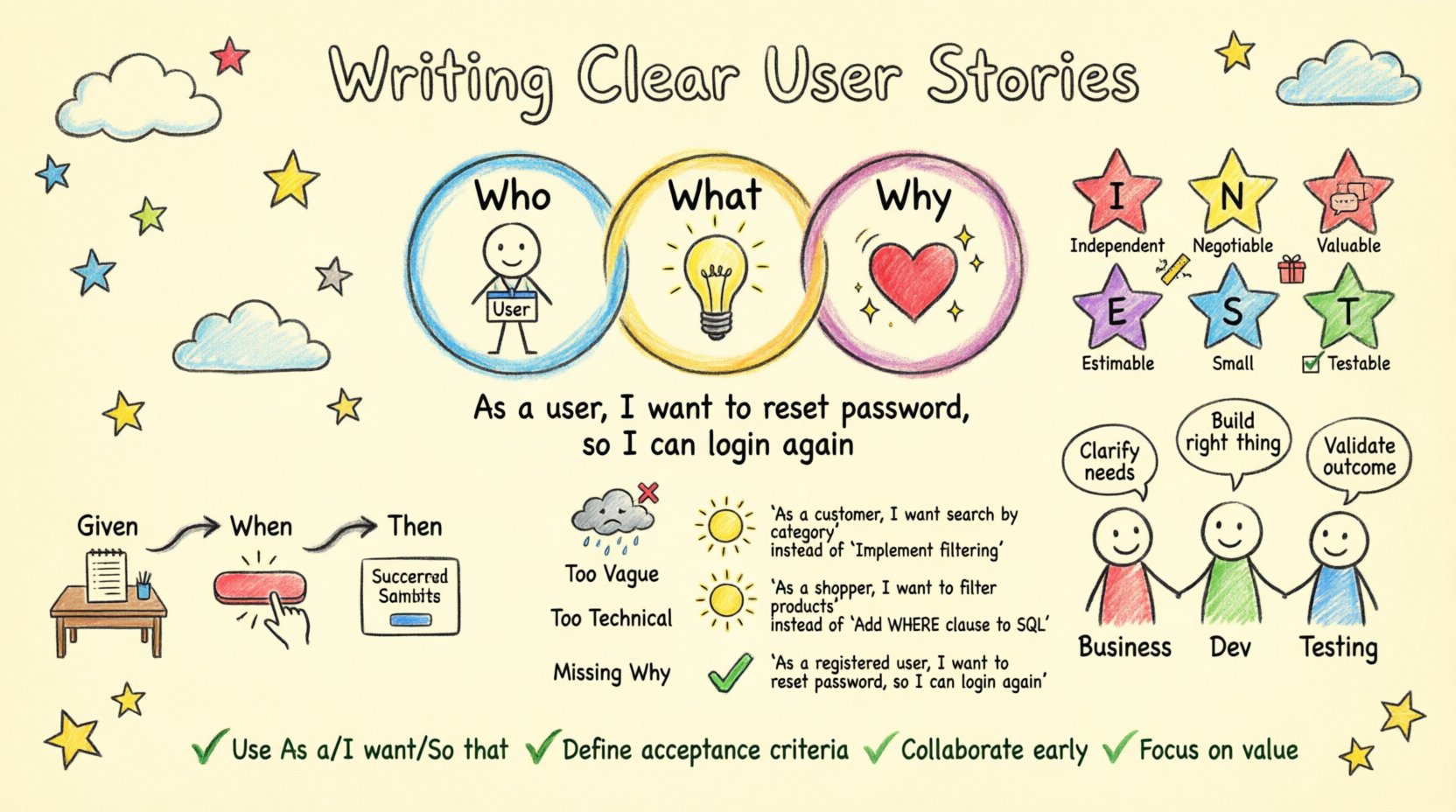
The most common and effective format follows a simple pattern. This pattern helps keep the focus on the user rather than the system.
- Who: The specific role or persona.
- What: The action or capability they need.
- Why: The value or benefit they receive.
Example: As a registered user, I want to reset my password via email, so that I can regain access to my account quickly if I forget my credentials.
The INVEST Criteria
For a user story to be viable, it should ideally adhere to the INVEST model. This acronym acts as a checklist to ensure quality.
- Independent: Stories should be as independent as possible to allow for flexible scheduling.
- Negotiable: The details are open for discussion, not set in stone like a rigid contract.
- Valuable: Every story must deliver value to the user or stakeholder.
- Estimable: The team must be able to estimate the effort required to complete it.
- Small: Stories should be small enough to be completed within a single sprint.
- Testable: There must be clear criteria to verify the story is complete.
Why Clarity Matters for Developers 🛠️
Development teams operate on trust and information. When information is lacking, assumptions fill the void. Assumptions are the enemy of quality. Clear user stories reduce the cognitive load on developers, allowing them to focus on implementation rather than deciphering requirements.
Reducing Technical Debt
Unclear requirements often lead to incorrect implementations. When developers build something that does not match the actual need, the code must be refactored or rewritten. This creates technical debt and slows down future iterations. Clear stories prevent this by setting expectations early.
Improving Velocity
When a team spends less time asking questions and more time coding, velocity increases. While velocity is not the sole metric of success, a reduction in ambiguity directly correlates to a smoother workflow. Clear stories act as a contract that defines the scope, preventing scope creep during the sprint.
Step-by-Step Guide to Crafting Stories 🚀
Creating a high-quality user story is a deliberate process. It involves research, drafting, and refinement. The following steps outline how to move from a raw idea to a ready-to-develop story.
1. Identify the Persona
Before writing a story, you must know who it is for. Personas are archetypes of your users. They help ground the story in reality rather than abstraction.
- Is it a new user or an existing one?
- Are they an administrator or a standard consumer?
- Do they have specific technical limitations?
2. Define the Need
Once the persona is clear, define the problem they are facing. What is the pain point? What is the gap between their current state and their desired state? Avoid prescribing the solution at this stage; focus on the problem.
3. Draft the Story
Write the story using the standard format. Keep it concise. If a story is too long, it likely contains multiple needs and should be split. A good rule of thumb is that a story should fit on a single index card (digitally or physically).
4. Define Acceptance Criteria
This is the most critical step. Acceptance criteria define the boundaries of the story. They are the conditions that must be met for the story to be considered complete. Without these, the definition of done is subjective.
Acceptance Criteria Deep Dive 🎯
Acceptance criteria are the contract between the product owner and the development team. They are not the same as the user story itself. The story describes the goal; the criteria describe the specific conditions of success.
Types of Acceptance Criteria
- Functional: Describes specific behaviors of the system.
- Non-Functional: Describes performance, security, or reliability requirements.
- Business Rules: Describes constraints or logic that must be followed.
Using Gherkin Syntax
For complex logic, a structured format like Gherkin can be highly effective. It uses a plain language structure that is readable by both business stakeholders and technical staff.
- Given: The initial context or state.
- When: The action taken by the user.
- Then: The expected outcome.
Example Table: Login Functionality
| Scenario | Given | When | Then |
|---|---|---|---|
| Successful Login | User has a valid account | User enters correct credentials | System redirects to dashboard |
| Invalid Password | User has a valid account | User enters incorrect password | System displays error message |
| Account Locked | User has 3 failed attempts | User enters password | System locks account for 15 minutes |
Common Pitfalls and How to Avoid Them ⚠️
Even experienced teams fall into traps when writing stories. Recognizing these patterns early can save significant time and effort.
Pitfall 1: Too Vague
Bad: “As a user, I want a search function.” Why it fails: It does not define what is being searched, how results are displayed, or performance expectations. Fix: “As a shopper, I want to search for products by category so I can find items quickly.”
Pitfall 2: Too Technical
Bad: “As a developer, I need to update the API endpoint to v2.” Why it fails: This describes technical debt, not user value. It does not explain why the change is needed. Fix: “As a shopper, I want to see real-time inventory updates so I know if an item is in stock.”
Pitfall 3: Missing the Why
If the value proposition is missing, the team cannot prioritize effectively. They might build the feature but miss the core intent.
Pitfall 4: Combining Multiple Stories
Putting two distinct needs into one story makes estimation difficult and testing complex. If one part fails, the whole story fails. Split them.
Collaboration and Refinement 🤝
Writing a story is not a solitary activity. It is a collaborative effort. The goal is to create a shared understanding among the Product Owner, the Development Team, and Quality Assurance.
Backlog Refinement
Refinement sessions are dedicated times to review upcoming stories. During these sessions, the team breaks down large epics into smaller stories. They clarify requirements and ask questions. This process ensures that when the sprint planning meeting occurs, the stories are ready to be pulled into a sprint.
The Three Amigos
This concept suggests that three perspectives should review a story before work begins:
- Business: Does this solve the right problem?
- Development: Can we build this with our current architecture?
- Testing: How do we verify this works?
Developer Feedback Loop
Developers often find gaps in the requirements during the estimation phase. This is not a failure; it is a feature. Their feedback should be incorporated into the story immediately. This keeps the requirements accurate and up-to-date.
Prioritization Strategies 📊
Not all stories are created equal. Resources are finite, so prioritization is essential to deliver the highest value first.
MoSCoW Method
This method categorizes stories into four buckets:
- Must Have: Critical for the release.
- Should Have: Important but not vital.
- Could Have: Desirable but optional.
- Won’t Have: Agreed to be left out for now.
Value vs. Effort Matrix
Plotting stories on a matrix helps visualize trade-offs. High value, low effort stories are quick wins. High value, high effort stories are major initiatives. Low value stories should be deprioritized or eliminated.
Measuring Success 📈
How do you know your user stories are working? Look at the outcomes of the development process.
Velocity Stability
If the team consistently completes stories within the estimated time, the stories are likely well-defined. If velocity fluctuates wildly, the stories may be too ambiguous.
Bug Rates
Post-release bugs often stem from misunderstood requirements. A drop in bug rates after implementing clearer acceptance criteria indicates improved story quality.
Team Morale
When developers feel confident about what to build, their engagement increases. Ambiguity creates frustration. Clear stories foster a positive working environment.
Handling Changing Requirements 🔄
Agile embraces change, but change can disrupt clarity. When requirements shift, the user story must be updated immediately.
Updating Stories
Do not delete the old story and create a new one unless the scope is entirely different. Instead, annotate the existing story with the change. This preserves the history of why decisions were made.
Communication
When a story changes mid-sprint, communicate this to the whole team. If the change impacts the sprint goal, the team may need to swap stories to maintain balance.
Conclusion on Clarity
The quality of your software is directly linked to the quality of your requirements. Writing clear user stories is the most effective way to align expectations and drive value. It requires discipline, collaboration, and a commitment to the user.
By following the structure outlined here, focusing on acceptance criteria, and maintaining open communication, teams can build robust products efficiently. The goal is not perfection in the first draft, but continuous improvement in clarity. Start with the persona, define the value, and specify the boundaries. This approach turns vague ideas into actionable work that delivers real results.
Remember, the story is a promise to the user. Keep that promise by being precise. When the team understands the goal, they can innovate within the solution to achieve it. This is the essence of effective Agile development.
Key Takeaways
- Format Matters: Use the standard “As a… I want… So that…” structure.
- Criteria are Key: Define acceptance criteria to eliminate ambiguity.
- Collaborate: Involve developers and testers early in the writing process.
- Refine Continuously: Stories evolve as understanding deepens.
- Focus on Value: Always prioritize the user benefit over technical tasks.
Adopting these practices will lead to a more predictable and productive development cycle. Clarity is the ultimate goal, and it is achievable through consistent effort and attention to detail.