


Introducing young professionals to the visual language of software architecture is a critical step in their growth as engineers. The Unified Modeling Language (UML) serves as the standard notation for documenting object-oriented systems. However, translating abstract code structures into visual diagrams often proves challenging for those entering the field. This guide outlines effective methods for teaching UML class diagrams, focusing on clarity, practical application, and foundational understanding without relying on specific proprietary tools.
When junior developers first encounter class diagrams, they often view them as administrative overhead rather than a design aid. The goal of instruction is to shift this perspective. We aim to show how these diagrams act as a blueprint, reducing complexity and improving communication within engineering teams. By establishing a strong grasp of the core components and relationships early on, learners can build systems that are maintainable and scalable.
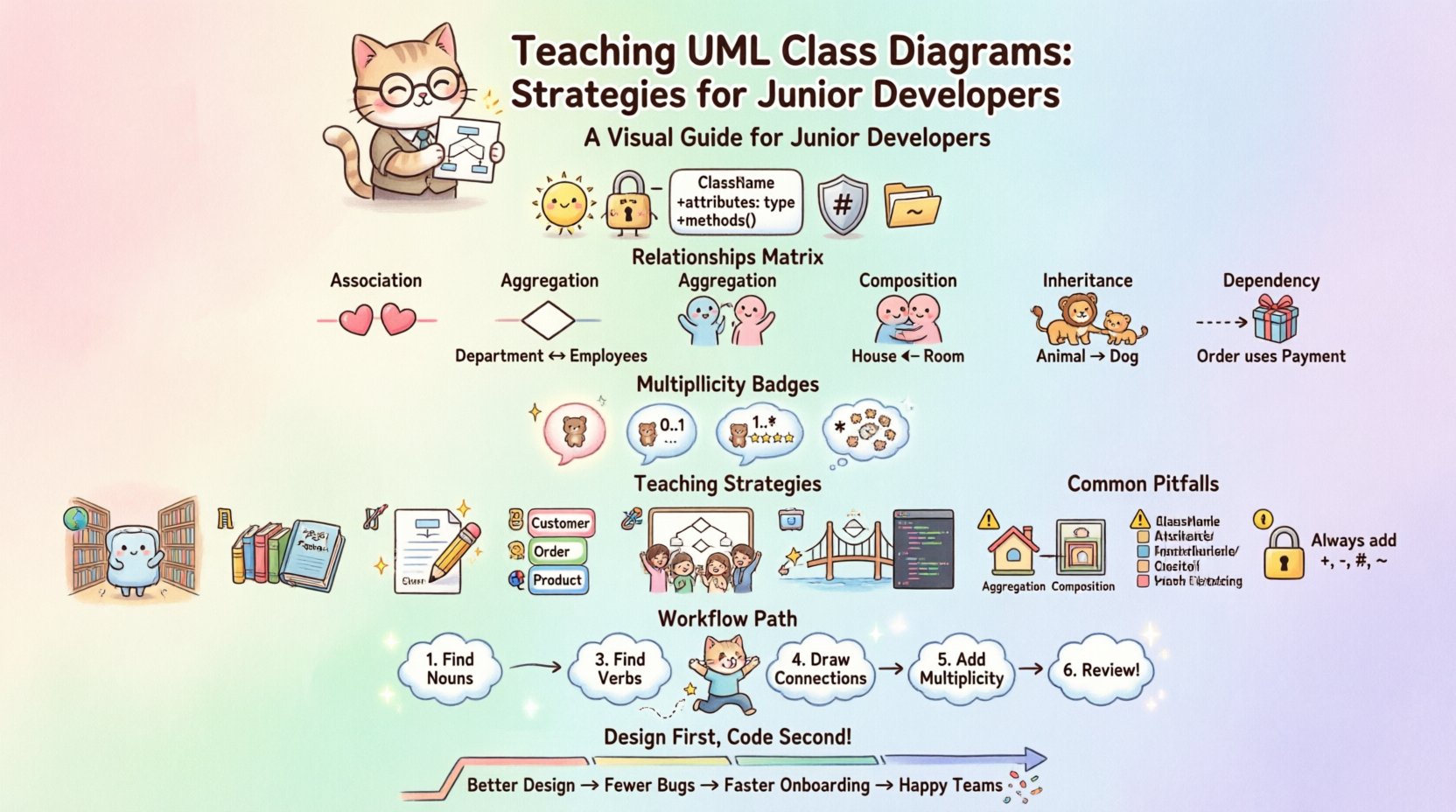
🧩 Understanding the Core Components
Before drawing lines and boxes, it is essential to understand the building blocks of a class diagram. Each element carries specific semantic weight. In the context of object-oriented programming, a class represents a blueprint for creating objects. A diagram visualizes these blueprints and their interactions.
1. The Class Box
A class is typically represented as a rectangle divided into three compartments:
Class Name: Located at the top. This should use PascalCase or CamelCase conventions.
Attributes: Located in the middle. These define the state or data properties of the class.
Methods: Located at the bottom. These define the behavior or functions the class can perform.
Visibility modifiers are crucial for defining scope. We use specific symbols to denote access levels:
+ (Plus sign): Public. Accessible from anywhere.
– (Minus sign): Private. Accessible only within the class.
# (Hash sign): Protected. Accessible within the class and its subclasses.
~ (Tilde): Package-private. Accessible within the same package or namespace.
2. Data Types and Signatures
Attributes and methods must declare their data types. This prevents ambiguity during implementation. For example, an attribute named userAge should be annotated as : int. A method named calculateTotal should show its return type, such as : double, and list its parameters.
🔗 Visualizing Relationships
The true power of a class diagram lies in how it depicts the connections between classes. Understanding the nature of these links is vital for system design. There are five primary relationship types that every learner must distinguish.
Relationship Matrix
The following table outlines the distinct relationship types, their visual notation, and their semantic meaning.
Relationship | Notation | Meaning | Example |
|---|---|---|---|
Association | Line | A structural link where objects know about each other. | A Teacher teaches Students. |
Aggregation | Line with hollow diamond | A “whole-part” relationship where parts can exist independently. | A Department contains Employees. |
Composition | Line with filled diamond | A strict “whole-part” relationship where parts cannot exist without the whole. | A House contains Rooms. |
Inheritance (Generalization) | Line with hollow triangle | An “is-a” relationship where a subclass inherits from a superclass. | A Dog is an Animal. |
Dependency | Dashed line with open arrow | A usage relationship where one class depends on another for a short period. | A Car uses an Engine. |
Cardinality and Multiplicity
Relationships are not just binary; they often involve quantities. Multiplicity defines how many instances of one class relate to one instance of another. This is often written as numbers or ranges (e.g., 1, 0..1, *) near the ends of the association line.
1: Exactly one instance.
0..1: Zero or one instance.
1..*: One or more instances.
*: Zero or more instances.
📚 Pedagogical Strategies for Instructors
Teaching these concepts requires a structured approach. Junior developers often struggle with abstraction. The following strategies help bridge the gap between theoretical knowledge and practical application.
1. Start with Real-World Analogies
Abstract concepts are difficult to grasp without context. Begin with physical objects or common scenarios. For example, use a library system to explain classes. A Book class, a Member class, and a Loan class are tangible concepts. Explain how a Member borrows a Book. This clarifies the Association relationship before introducing code.
2. Iterative Refinement
Do not expect a perfect diagram on the first attempt. Encourage learners to start with a rough sketch and refine it. This process mirrors the actual software development lifecycle. It reduces the fear of making mistakes and emphasizes the diagram as a living document.
3. Focus on Naming Conventions
Consistency in naming is often overlooked. Teach learners to use meaningful names for classes, attributes, and methods. A class named Data is vague. A class named UserAccount is specific. This discipline improves the readability of the diagram and the resulting code.
4. Use Whiteboarding Sessions
Before moving to digital tools, use whiteboards or paper. This removes the distraction of software features. The focus remains on the logic and structure. Discuss the design as a group. This promotes collaboration and peer learning.
5. Connect Diagram to Code
Show the direct mapping between the diagram and the code. If a class has a method in the diagram, it must exist in the code. This reinforces the importance of documentation. It prevents the diagram from becoming a separate entity that is never updated.
⚠️ Common Pitfalls and How to Avoid Them
Even with good instruction, errors occur. Identifying these common pitfalls early can save significant time during development.
1. Over-Engineering
Juniors often try to model every possible scenario. This leads to overly complex diagrams that are hard to read. Advise them to model the current requirements first. Add complexity only when the system evolves.
2. Ignoring Relationships
Sometimes, classes are drawn without lines connecting them. This implies no relationship exists, which is rarely true in a functioning system. Ensure every class has a defined connection to others, or explicitly mark it as isolated if applicable.
3. Confusing Aggregation and Composition
This is a frequent point of confusion. The distinction lies in lifecycle management. If the part ceases to exist when the whole is destroyed, it is Composition. If the part can exist independently, it is Aggregation. Use clear examples to illustrate this boundary.
4. Inconsistent Notation
Using different line styles for the same relationship type creates confusion. Enforce a standard set of rules for the entire team. This ensures that anyone reading the diagram understands the meaning immediately.
5. Lack of Visibility Modifiers
Leaving out + or - symbols hides the encapsulation strategy. This can lead to security issues or tight coupling in the code. Always require visibility modifiers in the final design.
🛠️ Practical Exercise Workflow
To solidify understanding, follow a structured workflow during exercises. This ensures that the learning process is systematic and repeatable.
Step 1: Identify Nouns: Read the requirements and extract potential classes. These become the boxes.
Step 2: Identify Verbs: Look for actions. These become the methods or relationships.
Step 3: Define Attributes: Determine what data each class holds.
Step 4: Draw Connections: Link the classes based on the identified relationships.
Step 5: Add Multiplicity: Define how many objects interact.
Step 6: Review: Check for consistency, naming, and completeness.
📝 Documentation Standards
Once the diagram is complete, it must be maintained. Documentation standards ensure longevity and usability.
Version Control
Just like code, diagrams should be versioned. Store them in the same repository as the source code. This allows tracking of design changes over time. It helps new team members understand why a design decision was made.
Contextual Notes
Not every detail fits in a box. Use notes or comments to explain complex logic. This adds clarity without cluttering the visual structure.
Accessibility
Ensure the diagrams are accessible to all team members. Use standard formats that can be opened by various modeling applications. Avoid proprietary formats that lock the content to a specific vendor.
🔄 The Iterative Review Process
Design is never static. As requirements change, the diagram must evolve. Implement a review process where diagrams are scrutinized alongside code pull requests.
Consistency Check: Does the diagram match the current codebase?
Clarity Check: Is the diagram easy to understand for a new hire?
Completeness Check: Are all new features documented?
Optimization Check: Can the design be simplified without losing functionality?
🧠 Cognitive Load Management
For junior developers, cognitive load is a significant barrier. A dense diagram can overwhelm the mind. To mitigate this, encourage the use of sub-systems or packages.
Break large diagrams into smaller, manageable views. One view might focus on the core business logic, while another focuses on the data persistence layer. This modular approach to documentation makes the system less intimidating.
Furthermore, teach the concept of abstraction. Not every class needs to be drawn in detail. Some can be summarized as “black boxes” in high-level diagrams. This helps manage complexity and keeps the focus on the most critical interactions.
🌐 Collaboration and Team Dynamics
UML is a communication tool. It is not just for the individual developer. It facilitates dialogue between developers, designers, and stakeholders.
When teaching, emphasize the social aspect. A diagram is a shared artifact. It allows non-technical stakeholders to understand the system structure without reading code. This bridges the gap between business requirements and technical implementation.
Encourage pair diagramming. Have two developers work on the same diagram simultaneously. This promotes knowledge sharing and ensures that the design reflects multiple perspectives.
📈 Measuring Progress
How do you know if the teaching is effective? Look for specific indicators of improvement.
Reduced Debugging Time: Better design leads to fewer logical errors.
Faster Onboarding: New hires can understand the system faster using diagrams.
Consistent Code Quality: Code adheres more closely to the design specifications.
Improved Communication: Teams discuss design issues more clearly.
🎯 Final Thoughts on Design Discipline
Teaching UML class diagrams is about instilling a mindset. It is about thinking before coding. It is about recognizing that design is an investment in the future health of the software. While tools and notations are important, the underlying logic of object-oriented design is the true foundation.
By focusing on clear components, accurate relationships, and practical exercises, instructors can empower junior developers to create robust systems. The diagram becomes a map that guides the development journey, ensuring that the team stays on course and builds software that stands the test of time.
Remember, the goal is not perfection in the first draft. It is continuous improvement. As developers gain experience, their diagrams will naturally become more detailed and accurate. The key is to start with the basics and build from there.