


If you’re like many experienced developers and architects, you’ve probably rolled your eyes at the latest AI hype. “Another tool that promises to revolutionize everything?” you think. “Sure, just like the last ten.” We get it. The software industry is full of overpromising tools that underdeliver. But what if we told you there’s an AI-powered C4 diagram generator that actually does what it claims—without the fluff?
This isn’t about replacing your expertise. It’s about eliminating the tedious parts of software architecture documentation so you can focus on what really matters: solving complex problems. Let us show you, step by skeptical step, how the Visual Paradigm AI toolkit transforms a daunting task into a manageable workflow.
What You’ll Actually Get (No Hype, Just Results)
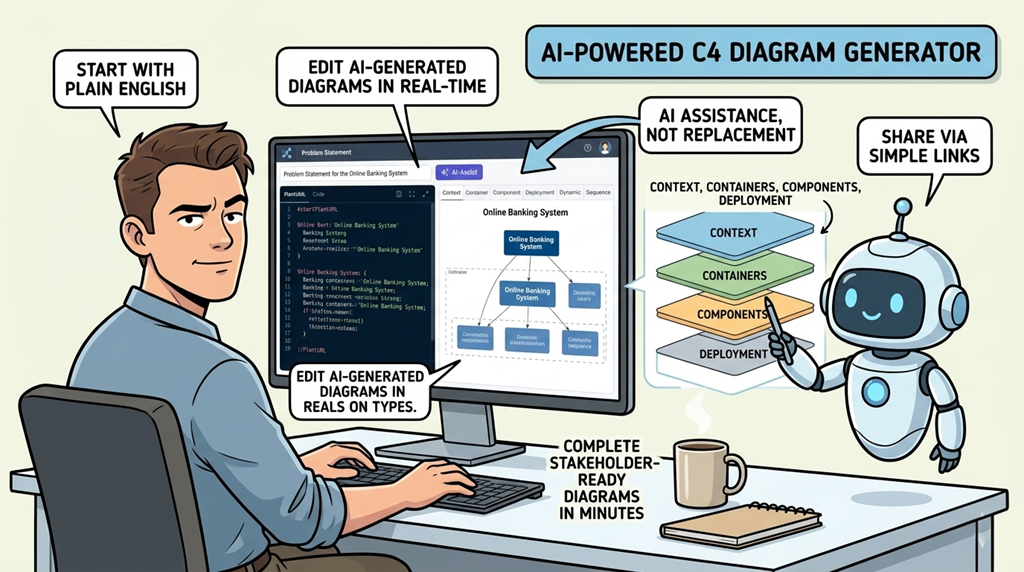
- Generate professional C4 architecture diagrams in minutes, not days
- Start with plain English—no special syntax required
- Edit AI-generated diagrams in real-time with a live preview editor
- Visualize your system at every level: context, containers, components, and deployment
- Share stakeholder-ready diagrams via simple links
- Maintain complete control—AI suggests, you decide
Step 1: The Problem Statement—Where AI Actually Listens
Here’s where skeptics usually bail out. “AI can’t possibly understand my complex system,” you might think. Fair concern. But watch what happens when you use the online C4 PlantUML maker.
Instead of requiring you to learn a new language or format, you simply describe your system in plain English. For this demonstration, we’re building an “Online Banking System.” You enter your project name and click “AI-Assist: Generate Full Problem Statement.” The AI doesn’t just spit out generic text—it analyzes your context and produces a structured, comprehensive problem statement that captures:
- The system’s core purpose
- Primary user types (customers, bank staff)
- Key interactions (account checks, transfers, payments)
- External dependencies
This becomes your single source of truth. The AI isn’t guessing—it’s organizing your requirements into a format that drives accurate diagram generation. You remain in control, editing the statement until it’s exactly right.

Step 2: Context Diagram—See Your System’s Big Picture Instantly
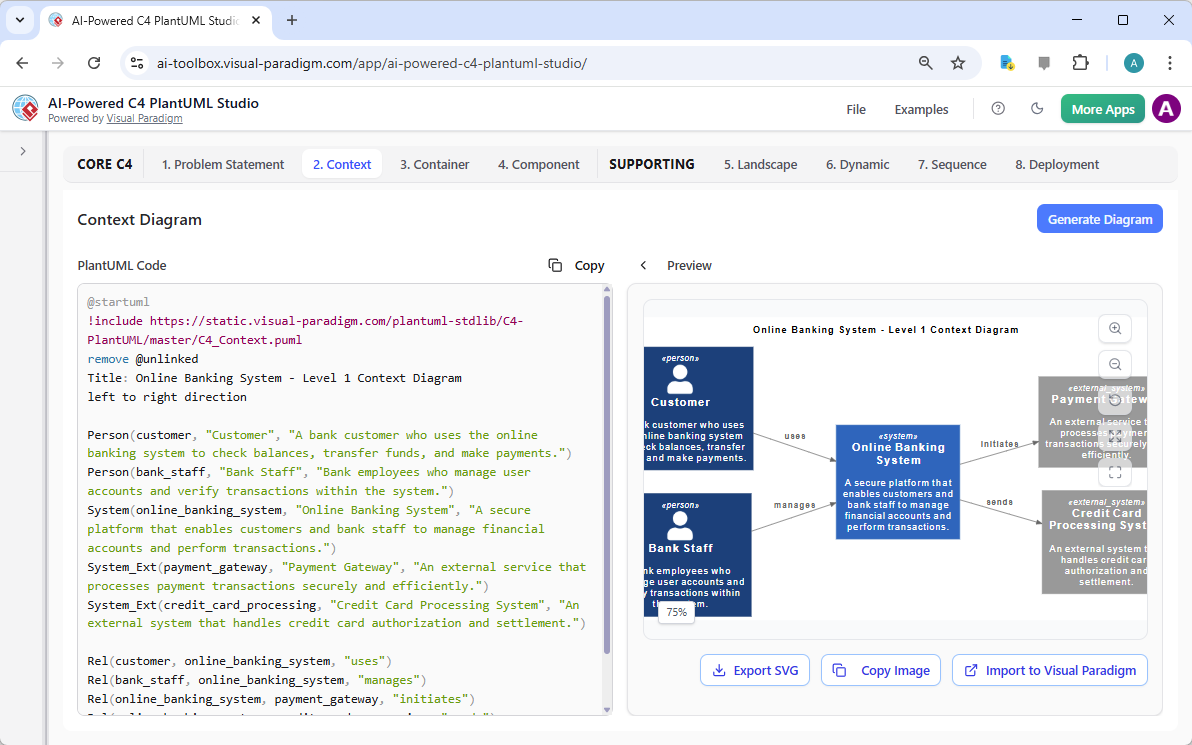
This is the moment skeptics become believers. After defining your problem statement, you navigate to the “Context” tab. The AI diagram generator processes your requirements and produces a complete System Context diagram.
What you see: Your “Online Banking System” as the central box, surrounded by:
- Human actors: “Customer” and “Bank Staff”
- External systems: “Payment Gateway” and “Credit Card Processing System”
- Clear relationship lines showing who interacts with what
But here’s the transparency skeptics appreciate: The left panel shows the actual PlantUML code. The right panel shows the rendered diagram. They update in real-time. You can see exactly what the AI generated, modify it directly, and watch the visual update instantly. No black box. No mystery. Just clear, editable code producing professional diagrams.
Step 3: Container Diagram—Drill Down Without the Drudgery
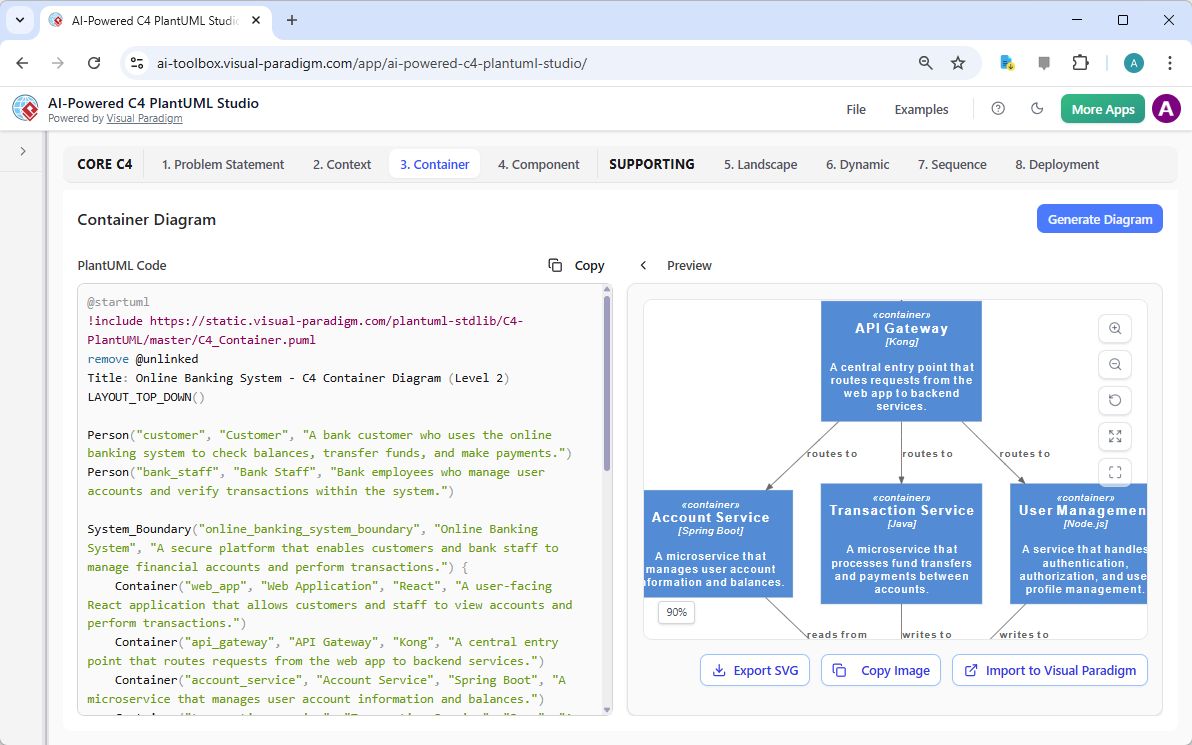
Now the architecture design tool helps you decompose your system. Moving to the “Container” tab, the AI analyzes your context diagram and problem statement to identify logical technical components.
Generated containers include:
- API Gateway (routing layer)
- Account Service (business logic)
- Transaction Service (payment processing)
- User Management (authentication/authorization)
The diagram shows how these containers communicate, with directional arrows indicating request flows. Again, you see both the PlantUML code and the visual representation side-by-side. The AI made intelligent suggestions based on banking system patterns, but you can add, remove, or modify any element. It’s assistance, not automation.
Step 4: Component Diagram—Zoom In Where It Matters
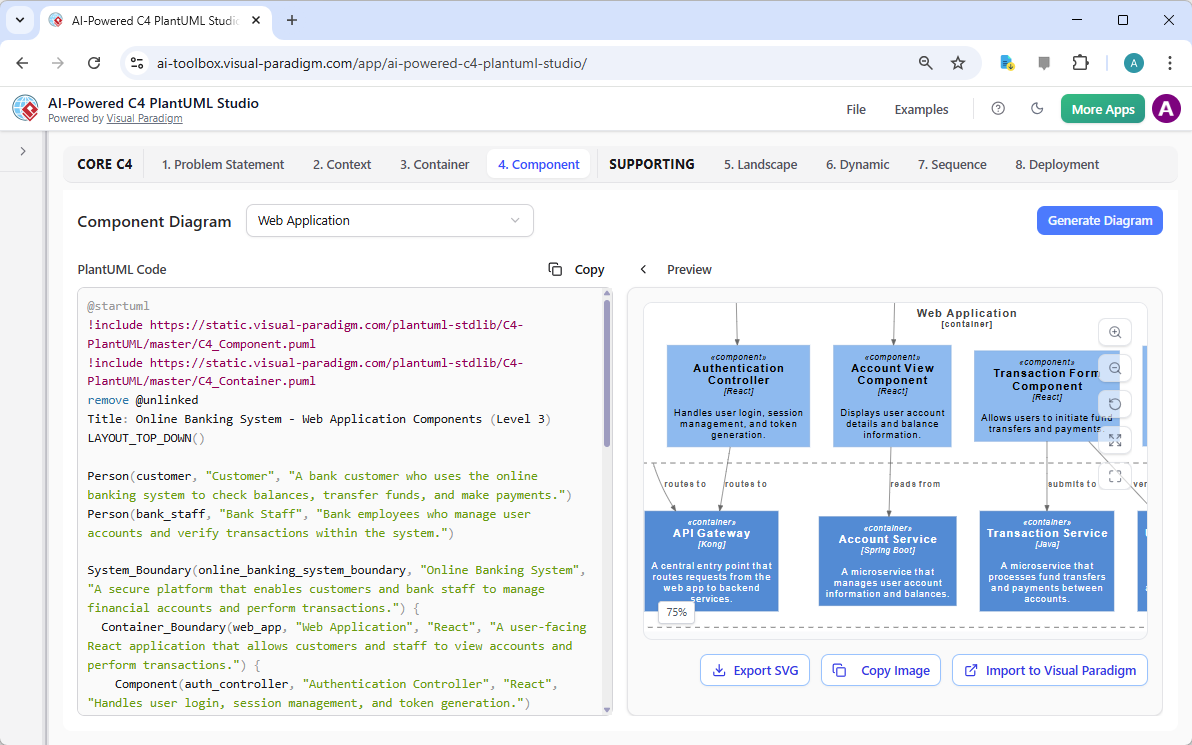
This is where traditional diagramming becomes tedious. Drawing every component manually? Hours of work. With the AI-powered C4 Studio, you select a container (like “Web Application”) and the tool generates its internal component structure.
The generated components include:
- Authentication Controller (handles login/logout)
- Account View Component (displays account data)
- Transaction Form Component (captures transfer details)
Each component includes a description of its responsibility. Developers get the detail they need without architects spending days drawing boxes. The split-screen editor lets you refine the structure while seeing immediate visual feedback.
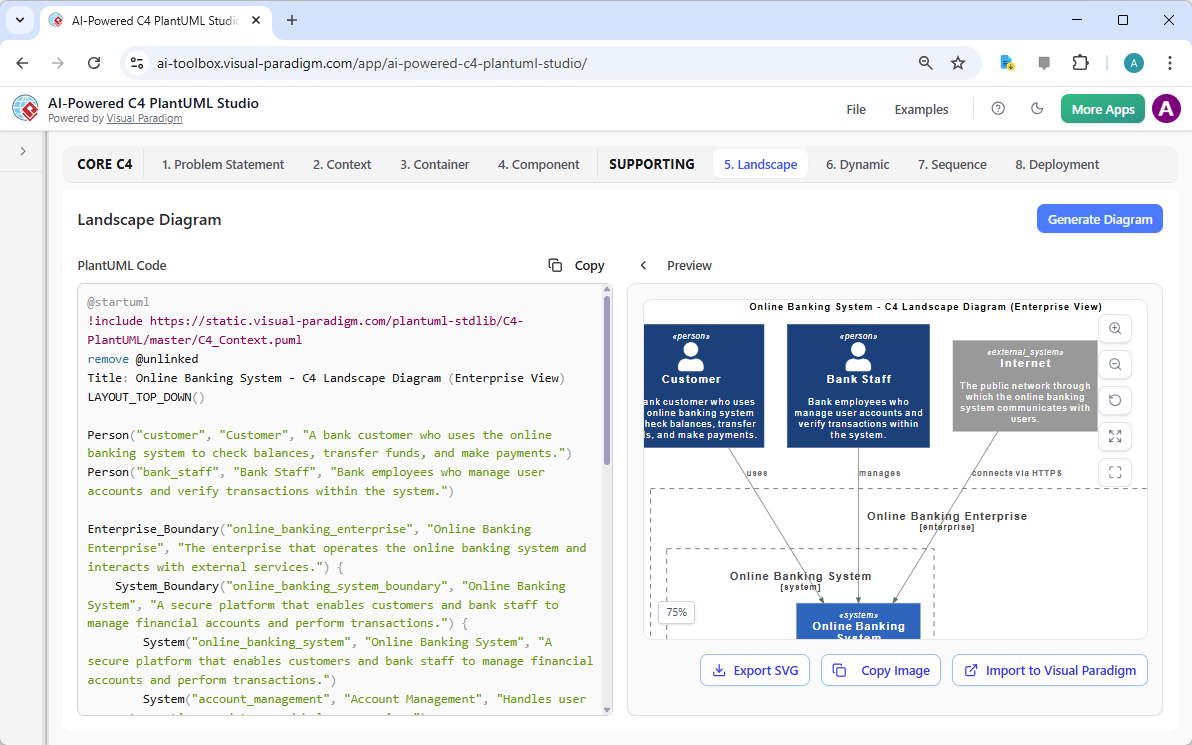
Step 5: Landscape Diagram—Enterprise Context Made Simple
Skeptics often worry that AI tools oversimplify. The “Landscape” diagram proves otherwise. This view places your “Online Banking System” within the broader “Online Banking Enterprise” boundary, showing how it connects to the public “Internet.”
This enterprise-level perspective helps stakeholders understand:
- Organizational boundaries
- External dependencies
- System scope and integration points
The C4 model template generator creates this view automatically, but you maintain full editorial control. It’s not about replacing your judgment—it’s about eliminating the repetitive work of drawing enterprise boundaries and connection lines.
Step 6: Dynamic Diagram—Watch Your System Come Alive
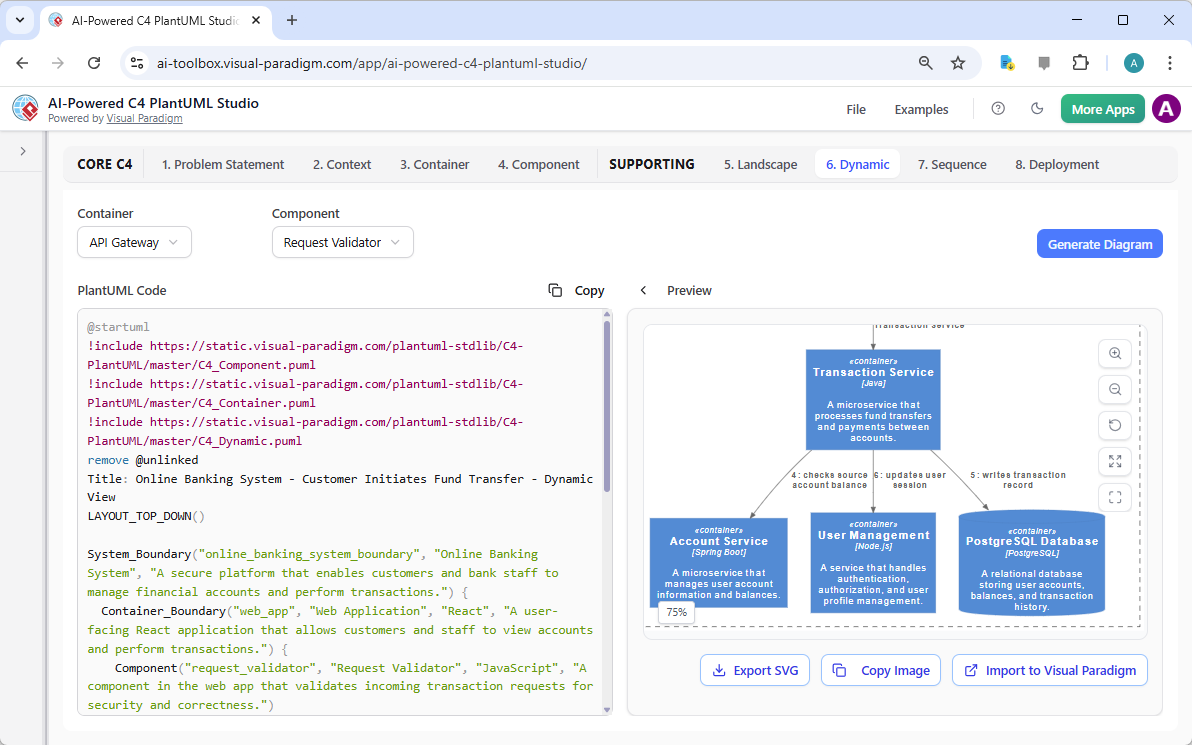
Static diagrams are useful, but how does your system actually behave? The “Dynamic” tab addresses this by generating interaction sequences. Select a container (like “Transaction Service”) and a component (like “Request Validator”), and the AI architecture visualization tool creates a dynamic flow diagram.
For a “Customer Initiates Fund Transfer” scenario, you see:
- Step-by-step component interactions
- Message flows between Transaction Service, User Management, and PostgreSQL Database
- Clear labels for each operation
This helps identify bottlenecks, security gaps, and logical errors before writing code. The AI generates the initial flow based on common patterns, but you adjust it to match your actual implementation.
Step 7: Sequence Diagram—Granular Control When You Need It
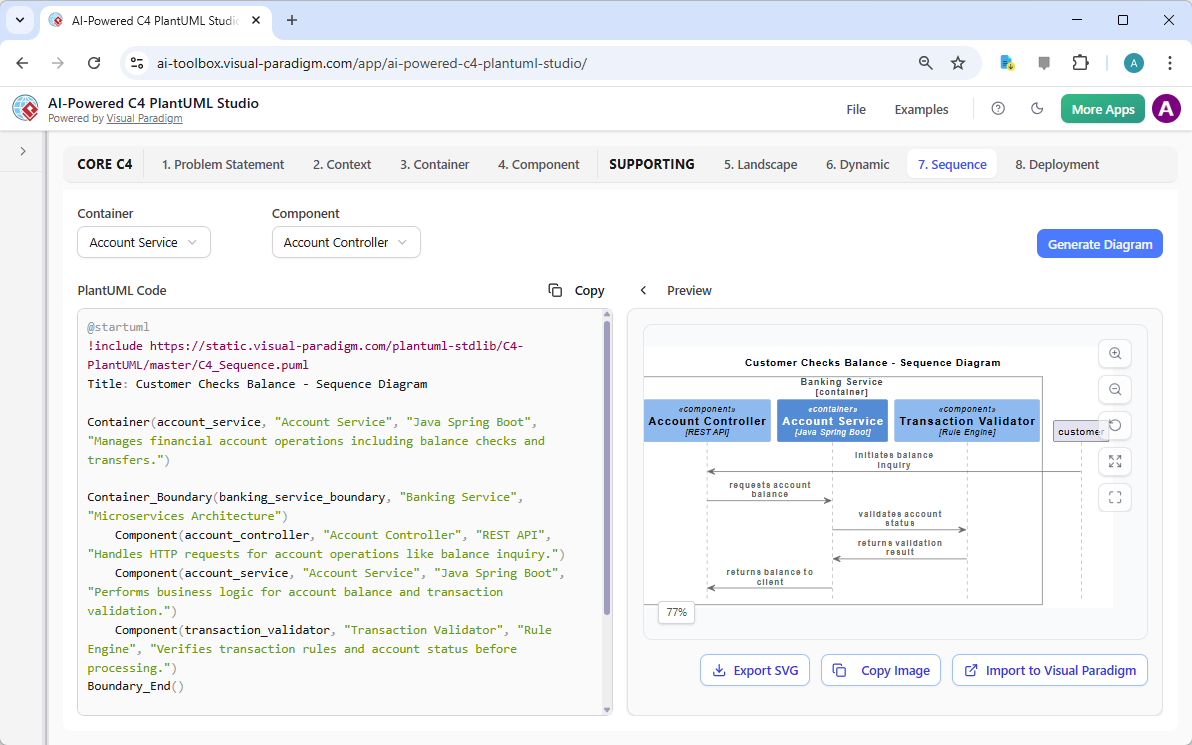
For detailed debugging and performance analysis, the “Sequence” diagram provides message-level precision. The C4 diagram automation tool generates a “Customer Checks Balance” sequence showing:
- Exact message order between Account Controller, Account Service, and Transaction Validator
- Chronological flow with timestamps
- Component dependencies and call hierarchies
This level of detail is invaluable for:
- Identifying race conditions
- Optimizing performance bottlenecks
- Ensuring correct error handling
- Onboarding new developers
The AI provides the initial structure; you refine it to match your exact business logic.
Step 8: Deployment Diagram—From Architecture to Infrastructure
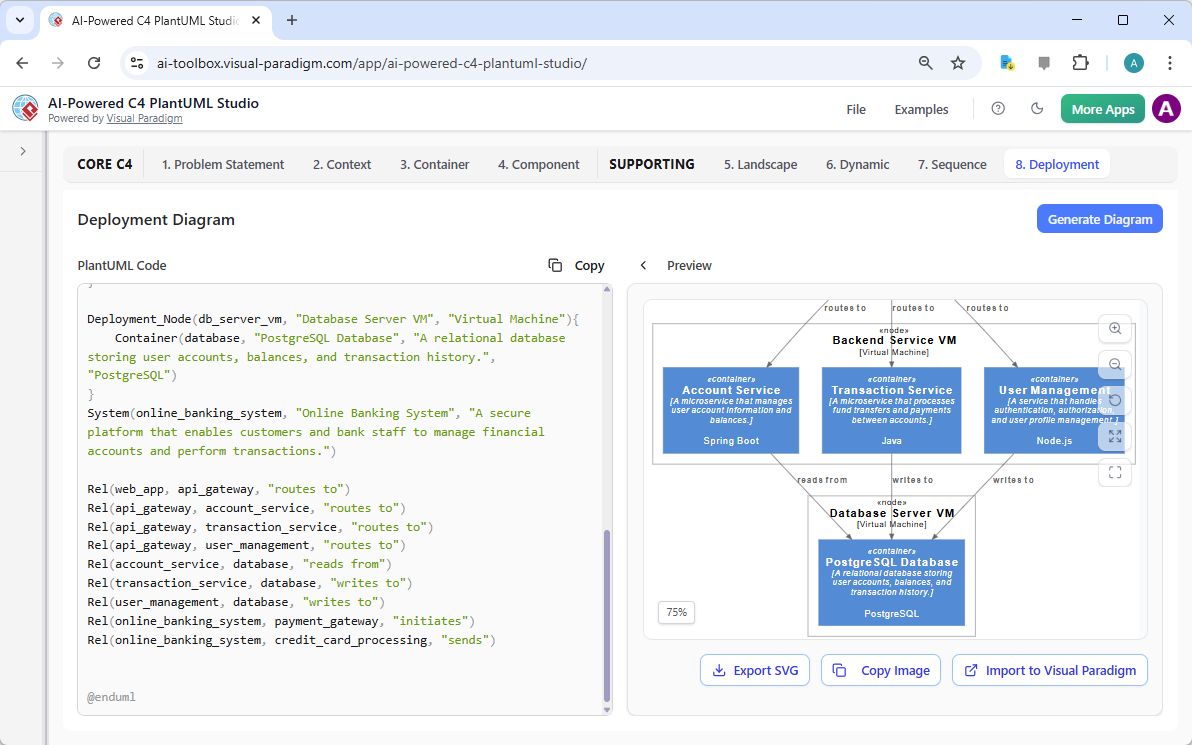
The final piece: How does this actually run? The “Deployment” tab generates infrastructure mappings. The AI-powered architecture generator creates a diagram showing:
- Backend Service VM hosting Account and Transaction Services
- Database Server VM running PostgreSQL
- User Management service on Node.js server
- Network topology and deployment relationships
DevOps teams use this to:
- Plan infrastructure requirements
- Design scaling strategies
- Configure monitoring and logging
- Document production environments
The AI suggests common deployment patterns; you customize for your specific cloud provider and compliance requirements.
Why This Works When Other AI Tools Don’t
You’ve been burned before. We understand. Here’s what makes the C4 model AI generator different:
1. Transparency Over Magic
You see the PlantUML code. You understand what the AI generated. You can modify it directly. No proprietary formats, no locked-in outputs.
2. You’re Always in Control
The AI suggests; you decide. Every diagram is editable. Every element can be changed. The tool assists your expertise; it doesn’t replace it.
3. Real Standards, Not Proprietary Formats
PlantUML is an open standard. Your diagrams aren’t trapped in a vendor-specific format. You own your architecture documentation.
4. Iterative Refinement
Start with AI generation, then refine through multiple iterations. The live preview shows changes instantly. No export/import cycles.
5. Practical Time Savings
What used to take days now takes hours. Not because the AI does everything, but because it eliminates the repetitive tasks while you focus on architectural decisions.
Addressing Common Skeptic Concerns
“AI will make me lazy and reduce my skills”
False. The C4 PlantUML design tool handles diagram mechanics, freeing you to think deeper about architecture. You’re still making all the design decisions.
“The output will be generic and useless”
The AI uses your specific problem statement as input. It’s not generating generic templates—it’s creating diagrams based on your requirements. You then customize extensively.
“I’ll lose control over my documentation”
You maintain complete control. The split-screen editor shows code and visual simultaneously. You can edit either. The AI is a starting point, not a final answer.
“It won’t integrate with our workflow”
PlantUML is text-based and version-control friendly. Export diagrams as PNG, SVG, or keep the source code in Git. Share via simple links or embed in Confluence, Notion, or your wiki.
Real Results, Not Promises
Here’s what actually happens when you use this online architecture diagram tool:
- Week 1: You generate your first context and container diagrams in under an hour. You’re skeptical but impressed by the speed.
- Week 2: You create component and sequence diagrams for your critical services. You catch a design flaw before coding begins.
- Week 3: Your team adopts the tool. Stakeholders finally understand the architecture through clear visuals.
- Month 2: Documentation stays current because it’s easy to update. New team members onboard faster.
- Month 3: You realize you’re spending 70% less time on diagrams and 70% more time on actual architecture problems.
Getting Started Without the Hype
Ready to see if this software architecture tool actually delivers? Here’s a no-nonsense approach:
- Start small: Pick one existing system. Don’t try to document everything at once.
- Write your problem statement: Be specific about what the system does and who uses it.
- Generate the context diagram: See what the AI produces. Modify it until it’s accurate.
- Share with one colleague: Get feedback. Does it communicate clearly?
- Iterate: Add containers, then components. Refine as you go.
- Evaluate: After documenting one system, decide if it’s worth continuing.
No commitment. No forced adoption. Just try it on one project and see if the results speak for themselves.
The Bottom Line for Skeptics
The AI-Powered C4 PlantUML Studio isn’t magic. It won’t design your system for you. It won’t replace your expertise or judgment.
What it will do:
- Eliminate hours of manual diagram drawing
- Provide intelligent starting points based on your requirements
- Maintain consistency across multiple diagram levels
- Keep documentation current with minimal effort
- Improve communication with stakeholders
The AI handles the mechanics. You handle the architecture. That’s the partnership. That’s how it actually works.
Still skeptical? Good. Skepticism keeps us honest. Try it on one project. See the results. Then decide. The tool is ready when you are. Try Now.
Related Resources
The C4 model is a hierarchical software architecture technique used to visualize systems at four distinct levels of abstraction: Context, Containers, Components, and Code. Visual Paradigm offers specialized tools to create these models, including AI-driven automation through the C4-PlantUML Studio, which can transform natural language descriptions into layered architecture diagrams. These features are designed to streamline the documentation lifecycle, ensuring that complex system designs remain scalable, maintainable, and clear for both developers and stakeholders. Recent updates have introduced full C4 model support across desktop and cloud platforms, enabling teams to use AI chatbots to instantly generate and refine component diagrams for various system types.
- Beginner’s Guide to C4 Model Diagrams: A foundational step-by-step introduction to creating diagrams across all four C4 levels for effective communication.
- C4 Model Tool – Visualize Software Architecture with Ease: An overview of the dedicated toolset used to manage architectural models at multiple levels of abstraction.
- AI-Powered C4-PlantUML Studio Diagram Generator: Details on a tool that combines AI automation with PlantUML flexibility to build C4 diagrams from text.
- Leveraging AI C4 Studio for Streamlined Architecture Documentation: A guide focused on using AI to maintain clean and scalable documentation for modern software systems.
- C4 Model Templates – Ready-to-Use Designs: A library of professionally designed templates to help teams quickly visualize system designs during planning.
- Unveiling the Power of C4 Model: Simplifying Architecture Diagrams: An article exploring how cloud-based platforms simplify the creation of accurate C4 models.
- Visual Paradigm Full C4 Model Support Release Notes: Documentation on the latest features enabling comprehensive C4 diagram management in Visual Paradigm.
- A Comprehensive Guide to AI-Powered C4 PlantUML Studio: An exploration of how generative AI creates layered, reliable diagrams from natural language input.
- C4 Model AI Generator: Automating Lifecycle Management: A look at how AI chatbots automate the modeling lifecycle to provide consistent results for DevOps and cloud teams.
- The Ultimate Guide to C4-PlantUML Studio Design: A resource detailing how AI-driven automation enhances the clarity and flexibility of software architecture design.